TaskFANG · Windows utility
Coming soon to Microsoft StoreFile Finder
Find files by what you remember.
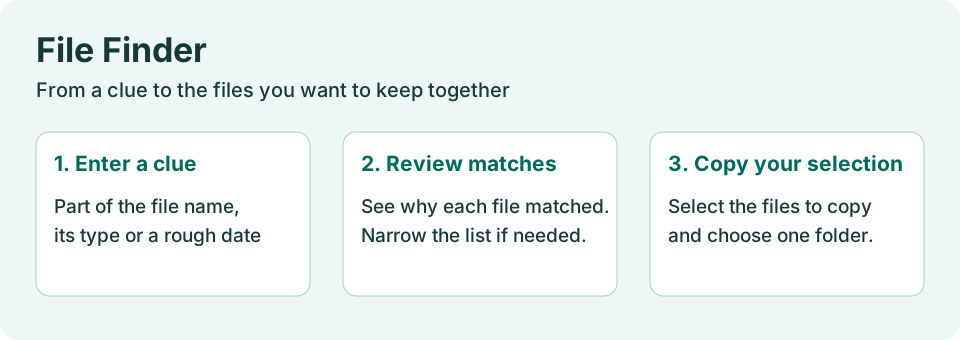
Write what you remember about a file, in your own words. File Finder shows how it understood you, lists the files that fit with the reason for each, and copies the ones you tick to one folder.
Price: $19.90, one-time purchase of the version you buy, through Microsoft Store. The license is personal and for the purchaser's use only.
Search example
Who it's for
Anyone who knows a file is somewhere on the PC or on a USB drive, remembers a little about it, such as a word from the name, a client, roughly when, and does not want to dig through folders one by one.
What it does
- Understands a short description in your own words: a word from the name, a kind of file (PDF, Word, photos…), a time ("last month", "March", "about 2023"), a place ("maybe in Downloads", "not on drive D").
- Shows "This is how I understood you" as a list of items. Remove any item with its ×. Write "maybe" before what you are not sure of, and it only helps the order instead of hiding files.
- Every name word must be in the file's name or in one of its folders, in any order. Part of a word is enough: "invo" finds "invoice".
- Explains every result: which word was found where, and which date or place matched.
- Nothing found? It offers ways to look wider, one button each: similar spelling, names in Hebrew or English letters, a wider date, a word left out. Your exclusions always stay.
- Too many results? One short question (kind, year or folder), and filter buttons with counts above the list.
The search uses a list of file names kept on your PC: names, folders, dates and sizes only. It never reads what is inside the files. The list is made once, the first time; while the app is open it is kept up to date in the background.
Step-by-step guide
- Open File Finder. The first time, it makes the list of file names on your drives; on full drives this takes a while, and the window shows when it is ready.
- Write what you remember, for example: invoice cohen pdf last year maybe in downloads.
- Check "This is how I understood you". Remove an item with × if it is wrong, or change the description.
- Look through the results and the reason next to each file. Narrow the list by kind, year or folder if it is long.
- Tick the files you want, choose the folder to copy to, and keep the original names or number them under one name ("Project 001.pdf").
- Click Copy. Then open the folder from the window.
The copies
The files you tick are copied to the folder you choose; the originals are only read and are never renamed, moved or changed. Every copy is checked against what was read. An existing file is never overwritten: a new copy gets " (2)" in its name instead. A report next to the copies lists each original, its copy and the result. Before a large copy (a file over 500 MB, or more than 2 GB in total) you are asked first, and the free space is checked.
Questions
Does it search inside documents?
No. It searches names, folders, dates and sizes. It does not read the text of documents, recognise text in images, or search e-mail.
Which places are searched?
Every ready local drive of the PC, internal and USB. Network drives, cloud-only files, CD drives, the Windows and program folders, other users' profiles and the folders you copied to before are left out. A file stored only in the cloud is listed as "in the cloud, not on this PC" and is not downloaded.
Does it use AI or the internet?
No. The description is understood by fixed rules on your PC. Nothing is sent anywhere and it works offline.
Can it find a deleted file?
No. It finds files that still exist on your drives. It does not recover deleted files.
Which date does it use?
The "Date modified" that File Explorer shows, unless you ask for the created date. These are dates of the file on the disk, not when a mail arrived or a photo was taken.
Hebrew and English?
Both, also mixed. Accents and Hebrew vowel marks are ignored, and the "similar spelling" button can match a name written in Hebrew letters with the same name in English letters.
Requirements
Windows x64. Final supported Windows versions will be confirmed at release. Local or USB drives (not network folders).